Computer data is very valuable and losing data as a result of a hard drive crash, viruses or file deletion in accident can be very frustrating. Data loss is always very stressful whether its your favorite photos, priceless music, office documents or anything. Crashing hard drives is compulsory, it’s just a matter of time.
Backing up of your system should be the only effective method to prevent your computer from data loss. Still, few of the computer users are only backing up their systems regularly. Rest of the users are playing with their data. There are some common reasons like virus attack, hard drive crash, can’t CDs, DVDs & pen drives and sometimes human errors too that can lead to the deletion of the data.
That’s where data backup softwares comes into rescue that allows you to run backups automatically on regular time. Just make the settings to run scheduled backups and laid back without any tension of data loss. The data will be restored in case of future crash.
There are many backup softwares for windows that are available on the internet but user/administrator always look for reliable programs. Also, some of free backup windows programs are better in terms of functionality, reliability, interface as compared to costly paid softwares.
Making sure you got a reliable backup software for your PC, I am listing here the best free windows backup softwares to make sure you got plenty of options and choose the best suited.
So, have a closer look at the 20 most reliable windows backup tools for free download and tell us which application you like best in the comments section below.
Don’t forget to  subscribe to our RSS-feed and
 follow us on Twitter for recent updates.
1) Comodo Backup : Backup reliably copies your files to a safe place and keeps track of all changes to those files. It has extremely flexible scheduling and notification options, supports FTP destinations, can burn multisession DVDs, and has a synchronization mode for quick realtime backups.

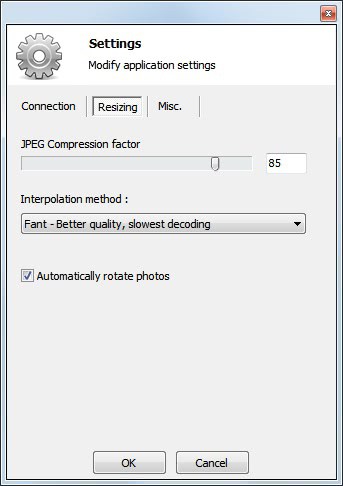
2) Cobian Backup : Cobian Backup is Open Source and backup software for windows. It is multi-threaded program that can be used to schedule and backup your files and directories.
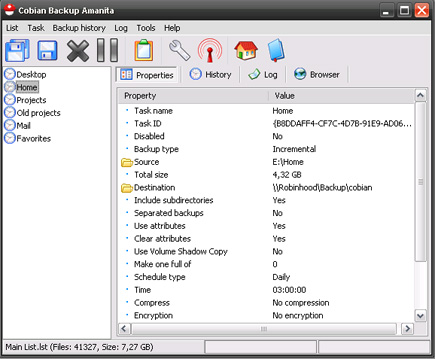
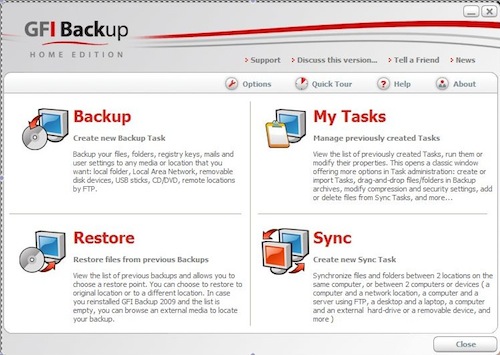
3) GFI Backup : GFI Backup – Home Edition enables you to back up your important documents, photos, music, emails and program settings using a simple but smart wizard-driven interface to most popular storage devices (including local and external disk drives, LAN, CD/DVD, removable devices, remote FTP servers, etc.). Download and use GFI Backup Home Edition today – a FREE easy-to-use backup software solution, designed for secure backups of all your important data.
4) MozBackup : MozBackup is a simple utility for creating backups of Mozilla Firefox, Mozilla Thunderbird, Mozilla Sunbird, Flock, SeaMonkey, Mozilla Suite, Spicebird, Songbird and Netscape profiles. It allows you to backup and restore bookmarks, mail, contacts, history, extensions, passwords, cache etc. It’s an easy way to do Firefox backup, Thunderbird backup etc. This program is freeware (even for commercial use) and works on Windows 98/ME/NT/2000/XP/2003/Vista/7.

5) Backup Maker : BackUp Maker is the professional solution for creating backups. The intuitive operation allows, despite the high range of functions easy and quick creation of new backup jobs to back up files and folders. Once set, you may pesky job of backup creation confidently forget – BackUp Maker saves your data automatically on demand, scheduled or event-dependent, such as the Windows login or logo.

6) EZBack-it-up : EZBack-it-up doesn’t ask you bewildering questions–it just backs up your data where and when you tell it to do it. It can compare thousands of files in mere seconds. Check EZBack-it-up’s logs to see what it’s done. If even this much attention to backup is more than you can stand, just install the program and schedule regular backups.

7) Todo Backup : Are your system, photos, music and financial data protected? EASEUS Todo Backup, supporting Windows 2000/XP/Vista/Windows 7 and Windows Server 2000/2003/2008, is potent FREE backup software providing system backup & restore, hard disk or partition backup & restore, disk clone to protect your system and disk. It can back up whole PC, including the operating system plus your data, applications, settings and everything!

8 ) Delta Copy : DeltaCopy is an open source, fast incremental backup program. Let’s say you have to backup one file that is 500 MB every night. A normal file copy would copy the entire file even if a few bytes have changed. DeltaCopy, on the other hand, would only copy the part of file that has actually been modified. This reduces the data transfer to just a small fraction of 500 MB saving time and network bandwidth.

9) Microsoft SyncToy : SyncToy 2.1 is a free application that synchronizes files and folders between locations. Typical uses include sharing files, such as photos, with other computers and creating backup copies of files and folders.

10) AceBackup : AceBackup is a powerful tool to create completely secure backups of your data. Store your data on any local storage device, on CD, DVD or on your remote FTP server! A special advantage of AceBackup is the possibility to backup single files and groups of files, for example for important or confidential documents. The program can also store different versions of your files. This can be useful if you would like to restore a certain version of your file at a later date.

11) DriveImage XML : DriveImage XML is an easy to use and reliable program for imaging and backing up partitions and logical drives. Image creation uses Microsoft’s Volume Shadow Services (VSS), allowing you to create safe “hot images” even from drives currently in use. Images are stored in XML files, allowing you to process them with 3rd party tools. DriveImage XML runs under Windows XP, Windows Server 2003, Vista and Windows 7 only. The program will backup, image and restore drives formatted with FAT 12, 16, 32 and NTFS.

12) Personal-Backup : Personal-Backup is a program to save personal data to any destination folder. It runs under Windows XP, Windows Vista, Windows Server 2003/2008 and Windows 7 (32- and 64-Bit). You can configure and store as many backup tasks as you want. The selecting of the files to backup is made on folder basis. All subfolders are included automatically. But the user can exclude ôr include any subdirectories from backup by selection or by filter. Additional criteria are the selection by file types, file age and/or file name filter.

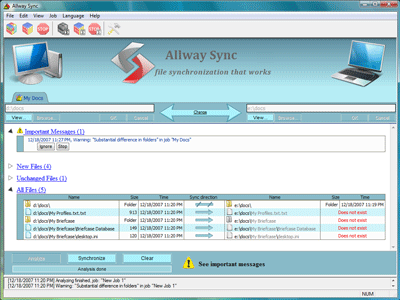
13) Allway Sync : Allway Sync is free file and folder synchronization software for Windows. Allway Sync uses innovative synchronization algorithms to synchronize your data between desktop PCs, laptops, USB drives and more. Allway Sync combines bulletproof reliability with an extremely easy-to-use interface.
14) DFIncBackup Home : DFIncBackup Home” is a freeware backup program designed for full, differential and incremental backup of files directly to zip archives. With it, you don’t have to backup all your files again and again, instead, you can backup only new ones or ones that have changed since last backup. You never lose or overwrite valuable files – all their versions will be stored into zip archives.

15) SE Backup : SE Backup, a simple and fast backup tool, you’ll be able to keep your data safe with no effort and no expenses.

16) FBackup : FBackup is a free backup software for both personal and commercial use. It protects your important data by backing it up automatically to any USB/Firewire device, local or network location. The backed up data can be either compressed (using standard zip compression) or an exact copy of the original files.

17) SyncBack Freeware : SyncBack is a freeware program that helps you easily backup and synchronize your files to: the same drive; a different drive or medium (CDRW, CompactFlash, etc); an FTP server; a Network; or a Zip archive. It is s free for personal, educational, charity, government, and commercial use.

18) Areca Backup : Areca Backup is an Open Source personal backup solution which is released under the General Public License (GPL) v2. It basically allows you to select a set of files / directories to back-up, choose where and how (as a simple file copy, as a zip archive, …) they will be stored, and configure post-backup actions (like sending backup reports by email or launching custom shell scripts).

19) JaBack : Automate Backups of your important files and folders. The backup set is created in standard ZIP format. This allows flexibility in restoring the data using any zip software to unzip the backup set.

20) Vista Backup Mill : Vista Backup Mill is designed to backup your files and folders as fast as possible with minimal effort and interruption on your part. It makes secure (AES-256 encrypted) backups of your personal data: documents, projects, articles, game saves, program configuration files, and private data. It can store backups on HDD, flash devices, remote FTP servers, or network computers. You can even point to multiple storage locations. Vista Backup Mill is designed to save you time configuring and administrating it.

You may be interested in the following related articles as well
- 7 Best Open Source Projects for .NET Developers
- 15 Must Have Free Software Programs For Windows 7
- Top 8 Best And Free Antivirus Software For Windows 7
- 18 Best Video Editing Software For Free Download (Windows)
- Top 10 Free Microsoft Products Worth Checking Out
Don’t forget to subscribe to our RSS-feed and follow us on Twitter for recent updates.


 Here are some of the computer related highlights from the leaked Walmart Black Friday ad.