I talked to my son John a few weeks ago and he was telling me that he was thinking about getting a new more powerful laptop computer for himself. Right now he has an almost one year old laptop running Windows Vista Home Premium and it just doesn't have the power that he wants. It has two gigs memory and a 383mb video card, and a 160gb hard drive. He also has two external hard drives that he uses for additional storage and an ipod. You can click here to see what he has now. I can understand him wanting a new one. John is a computer nut so to speak. He uses it for everything, music, movies, television, phone calls, programming, work and so on. Before John joined the Navy he was in college majoring in Computer Science and doing some tech support on the side. Usually he is doing several things with his computer at once and needs allot of power. "John is a power user".
Now, getting to my point, I have two desktop computers myself and my wife has one. My computers run Windows XP and Linux and my wife is using XP. I get allot of calls asking me for help with other peoples computers and since I don't have Vista I really can't help others that use that OS. John said that when he buys a new computer for himself that he would give me his current laptop. That will enable me to use and learn Vista. I am really excited by the prospect of owning a laptop with Vista. That would enable me to learn the OS and the flexibility to do work from other places besides my computer room/office. It will be nice to be able to sit in my living room in the recliner with my knees up instead of sitting here in my computer chair every time I want to do something with the computer. At the very least I'm sure that my blog will be updated more often when I get a laptop..... I'll let you know what he decides on when he finally buys a new computer, and thanks in advance John. :)
As a side note, I called my daughter Cindy but she was working and couldn't talk at the time. At least I know that she made it to Washington ok. :) I'm sure she will call me later when she has the time and I'll try to let you know what she is up to then.
Just my day to day stuff. Computers, Family and Life. Two kids in the U.S. Navy and one in the U.S. Army
Showing posts with label Desktop. Show all posts
Thursday, July 17, 2008
Thursday, April 17, 2008
My current Ubuntu Linux Desktop
Tuesday, March 25, 2008
Just waiting
Good morning. I sold the computer that I mentioned in an earlier post today. I had 3 calls about it this morning and one yesterday. The computer is going to a school teacher so it will go to good use.
My wifes friends Kara and Sheila from Arkansas are coming up to visit us this week. They should be here sometime today or tomorrow and are planning on staying until Sunday. My wife Vicki has been friends with them since they were kids. Kara is bringing her Dell Dimension 4600 with her for me to work on. It's running slow and has some other problems, but that is to be expected after 4 years. I will probably format the hard drive and reinstall the OS and suggest that she get some more memory for it.
Sunday, September 30, 2007
Saturday, September 29, 2007
Still Customizing My Desktop
Friday, September 28, 2007
Dual Monitor with a TV set
My Desktop on the Left and the Image on the TV on the right.

Below you can see my TV on the left with Windows media player playing and my live desktop on the right.

To customize my Desktop I used RocketDock and Desktop Sidebar.
I was a little bored today and now that my son joined the Navy and moved out I have his old bedroom as my computer room. I have a television about 5 feet away from the computer and it has an S Video jack so today I hooked the TV up to the Computer's video card S-Video out to use it as a second monitor, It was very easy to do. The whole thing took me about 10 minutes and only required an S-Video Cable and now I am watching the TV show Sliders from VeohTV on the TV and typing this on the computer at the same time. This is nice. I wish I would have done it years ago. The TV shows my desktop background when I have it set to the S-video input and I can drag any window on my desktop over to the TV to view. The picture on the TV is Great...
The Primary monitor is set to 1152-864 Screen Resolution and 32 bit Color.
The Second Monitor, or in this case my TV set is set to 800-600 Screen Resolution and 32 bit color.


You also might want to read "Make the Most of Your Dual Monitors" at lifehacker for more info and tips.

Below you can see my TV on the left with Windows media player playing and my live desktop on the right.

To customize my Desktop I used RocketDock and Desktop Sidebar.
I was a little bored today and now that my son joined the Navy and moved out I have his old bedroom as my computer room. I have a television about 5 feet away from the computer and it has an S Video jack so today I hooked the TV up to the Computer's video card S-Video out to use it as a second monitor, It was very easy to do. The whole thing took me about 10 minutes and only required an S-Video Cable and now I am watching the TV show Sliders from VeohTV on the TV and typing this on the computer at the same time. This is nice. I wish I would have done it years ago. The TV shows my desktop background when I have it set to the S-video input and I can drag any window on my desktop over to the TV to view. The picture on the TV is Great...
The Primary monitor is set to 1152-864 Screen Resolution and 32 bit Color.
The Second Monitor, or in this case my TV set is set to 800-600 Screen Resolution and 32 bit color.

You also might want to read "Make the Most of Your Dual Monitors" at lifehacker for more info and tips.
Friday, September 07, 2007
New HP Elite m9000 Series Desktop PC

The new HP Elite m9000 Series Desktop PC sports an Intel Core 2 Quad Processor Q6600, a DX10-happy NVidia GeForce 8400 GS card, and a dual-format blue-laser combo drive that will playback both Blu-ray and HD DVD discs. The system also features “unlimited” storage expandability, starting with double-HDD bays for secure mirrored disc arrays.
Read more about it here.
Monday, August 27, 2007
More on Dell and how things are playing out.

I talked to "Thomas", a Business Controls Manager from Dell today. He contacted me last week after I posted about my sons bad experience with trying to order a Dell XPS M1330 Laptop and subsequent cancellation of that order. Dell made us an offer that I think is kinda fare ( They would match a competitor's price on a laptop with similar components, and he would also work on getting it shipped quickly ). I would think with all that we went through last week that the offer would be better than that for someone serving in the military, but I digress. I will have to talk to my son and find out if this is the route he wants to take. He really had his heart set on a Dell XPS but the bad experience left a bad taste in his mouth, and mine.
After talking to "Thomas" from Dell today I talked to my Father ( a retired Physicist ) and he was telling me that a friend of his just got a new Dell Desktop and the LCD monitor didn't work when he set it up. After 45min on the phone Dell agreed to send him a new monitor. My Dad said to me "I thought they "Dell" would have tested the monitor before it was shipped". He also conveyed that another of his friends had spent 4 hrs on the phone with Dell tech support trying to get another problem resolved. This is really sad for a company that was always a leader in their filed of Direct to consumer sales. Hopefully Dell can pull itself out of this slump and come out on top again. I currently own two Dell computers and have had others before these. With the exception of a few minor problems in the past I have been very happy with them. By the way, Dad has two Dell computers also...
I am hesitant on recommending Dell to my friends and family at the current time but hopefully that will change in the near future. I will let you know how this all plays out.
Thursday, August 23, 2007
Dell's New XPS 420 Details Revealed

Engadget has posted details about the up coming Dell XPS 420. The XPS 420 will have hardware MPEG-4 encoder and Vista SideShow display up top. The other features of the system are Core 2 Duo Extreme or Quad processor, Intel X 38 chipset with DDR2 800, Dell Xcelerator hardware MPEG-4 encoder, ten USB ports, two 1394 ports and audio ports in front and back. The MiniView (SIdeShow) up top shows time, date, calendar, system stats and controls for media access.
You can read more on Engadget.
Thursday, June 01, 2006
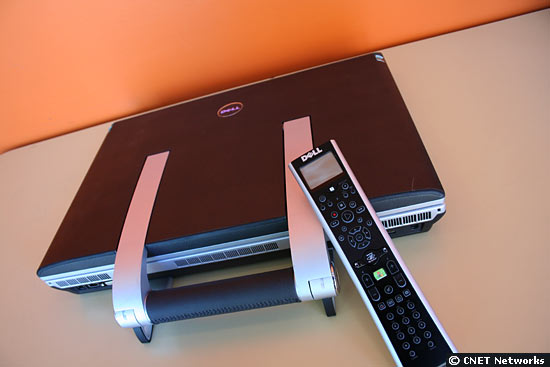
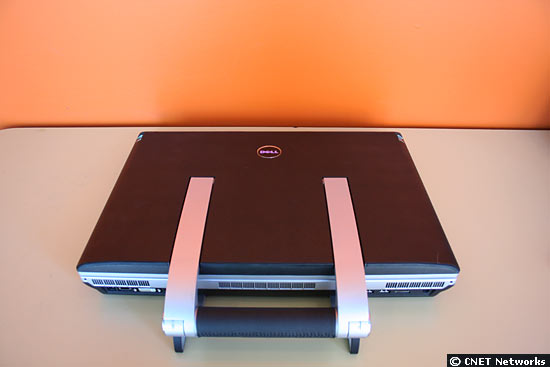
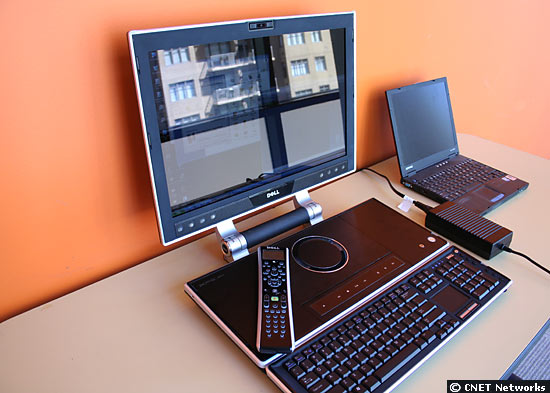
Dell designs a "desknote" Desktop / Notebook


Dell's new XPS M2010, which starts at $3,500, includes two hard drives with up to 120GB capacity each, a Core Duo processor and 4GB of dual-channel (667MHz) memory.
The Dell XPS M2010 comes with a detachable wireless Bluetooth-enabled keyboard. A remote acts as a mouse. At nearly 20 pounds, the new Dell XPS M2010 is almost twice the size of compact laptops. In addition to executing expected computer functions, the XPS M2010 is designed to be a multimedia device. It sports a combination DVD+RW drive, a built-in video camera and digital microphone, and a 256MB video card for DVDs, 2D gaming and most high-end 3D gaming. For easy transport, the Dell XPS M2010 features a handle attached to the case. Attached to the flat horizontal PC, which remains on the desk, is a 20.1-inch wide-screen monitor
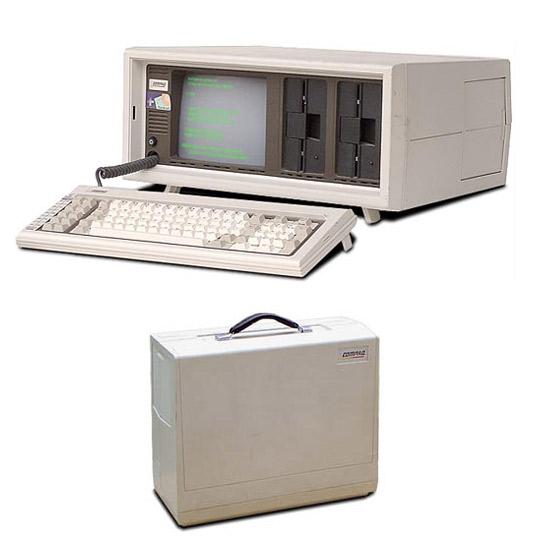
The concept behind Dell's luggable XPS M2010 harkens back to the early days of the PC era, when just about anything smaller than a mainframe could be considered a portable computer. The original Compaq Portable, seen here, even matched up to the new Dell in price ($3,590, according to Oldcomputers.net) and weight (OK, at 28 pounds, it was still a little chunkier).

For that price, back in 1983, you got this: a 4.77MHz Intel 8088 processor, 128K of RAM, two floppy drives, a 9-inch monochrome monitor and MS-DOS.
See more at Cnet
Read Cnets Review of the XPS M2010
Friday, March 24, 2006
The $10,000 Dell PC

STARTING at $9930, the PC has a Pentium Extreme Edition processor that has been overclocked from 3.73 to 4.26 GHz, 2GB DDR2-667 memory, a 160 GB 10,000 RPM WD Raptor as well as a second WD 400 GB 7200 RPM hard drive. PC also comes with a FOUR GeForce 7900 GTX graphics processors with a total of 2 GB of GDDR3 memory.
read more | digg story
Subscribe to:
Posts (Atom)